
by admin | Oct 30, 2026 | Custom Content, health, Wellness
Do you ever feel like you simply can’t catch a break? Maybe someone cuts you off in traffic or your boss gives you negative feedback.
Do you sometimes find yourself feeling negative or cynical? Of course, we all experience these feelings from time to time. However, ongoing negativity can contribute to depression, which has been linked to poorer heart health, including inflammation and a weakened immune system.
Some neuroscience experts believe that our brains naturally pay more attention to negative experiences so we can remember pain and avoid similar situations in the future. This tendency is known as “negativity bias.” One way to counterbalance this natural tendency is through practicing gratitude.
The American Psychological Association defines gratitude as “a sense of happiness and thankfulness in response to a fortunate happenstance or tangible gift.”
Research has found that practicing gratitude is associated with a variety of positive effects on physical and mental well-being. Expressing gratitude may improve sleep, mood, and immunity while helping reduce depression, anxiety, chronic pain, and illness.
So, being grateful really can be a gift that keeps on giving. Who couldn’t use some of these benefits right now?
How Gratitude Supports Well-being
Gratitude can encourage positive thinking by helping you notice and savor the good around you, even during challenging times. This does not mean ignoring problems or pretending difficult emotions do not exist. Instead, it means approaching those experiences with a constructive and hopeful outlook.
A regular gratitude practice may help you:
- Feel more present and connected to positive experiences.
- Build a more optimistic outlook.
- Strengthen relationships by recognizing and expressing appreciation for others.
- Respond to stressors with greater calm and perspective.
- Develop resilience and recover more effectively from setbacks.
- Focus on the areas of life where you have support, purpose and meaning.
For example, you can feel anxious about an upcoming change while also feeling grateful for the people supporting you through it. Gratitude is not meant to minimize painful feelings or create guilt for having them. Both experiences can exist at the same time.
Simple Ways to Practice Gratitude
Starting small and practicing consistently can make gratitude feel more natural over time. Consider trying one of these ideas:
- Keep a gratitude journal. Write down a few things you are grateful for each day. Include why each one matters to help you reflect more deeply on the positive moments in your life.
- Use gratitude affirmations. Take a moment each day to identify something you appreciate and repeat it to yourself. Over time, these reminders can reinforce a more positive mindset.
- Express your thanks. Send a text, write a note or tell someone in person why you appreciate them. Sharing gratitude can strengthen your connection and brighten someone else’s day.
- Pause for mindful moments. Notice simple sources of joy or comfort, such as a sunny morning, a good meal, a kind gesture or a few quiet minutes. Take a breath and let yourself appreciate the moment.
- Take a gratitude walk. Go outside and intentionally notice what you appreciate in your surroundings. It may be nature, movement, fresh air or the small details you might otherwise overlook.
A Small Practice with Lasting Potential
Gratitude is not about forcing positivity. It is about making room to recognize what is going well alongside life’s challenges. By adding a few simple gratitude practices to your routine, you can support a more hopeful outlook, strengthen your sense of connection and create moments of calm throughout the day.
If you are struggling with ongoing stress, anxiety, depression or other mental health concerns, consider reaching out to a qualified mental health professional for support.
by admin | Oct 23, 2026 | Custom Content, Employee Benefits, Health Insurance
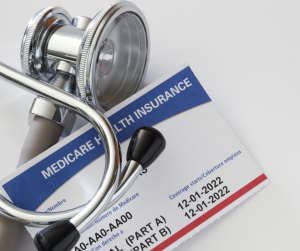
Your health insurance member identification (ID) card is more than just a piece of plastic (or a digital image on your phone)—it’s your passport to healthcare. It serves as proof of coverage and contains the vital information providers need to bill accurately and verify your benefits.
Because these cards are packed with abbreviations and strings of numbers, they can be a bit overwhelming. Here’s what you need to know about what’s on your card—and what it all means.
When to Use Your Card
You should keep your ID card (physical or digital) accessible at all times. You’ll need it during:
- Doctor Appointments: To verify your active coverage.
- Urgent Care or ER Visits: For immediate identification and billing.
- The Pharmacy: To ensure your prescriptions are processed through your insurance.
- Hospital Admissions: To coordinate your stay and surgical benefits.
- Billing Inquiries: When calling customer service to resolve a claim dispute.
Common Terms on Your Card
While every insurer designs their cards differently, most include these universal elements:
- Health Insurance Company: The name of your carrier (e.g., Blue Cross Blue Shield, UnitedHealthcare).
- Member ID / Policy Number: Your unique identifier. This is what the doctor’s office uses to look you up in their system.
- Group Number: If you have insurance through your employer, this number identifies your company’s specific plan.
- Policyholder Name: The name of the primary person on the plan. Note: Some cards only list the primary subscriber even if the whole family is covered.
- Plan Type: You might see acronyms like HMO, PPO, EPO, or HDHP. This tells providers which network rules apply to you. Your plan type tells you the steps you follow to receive care. For examply, in an HMO, a primary care physician (PCP) coordinates your care. You need a referral from your PCP before you can see a specialist.
- Pharmacy Info (Rx): Look for RxBIN, RxPCN, and RxGrp. Your pharmacist needs these specific codes to process your medications.
- Copay Amounts: Many cards list your “sticker price” for common visits (e.g., $25 for Primary Care, $50 for Specialists) right on the front.
Carrier and Contact Information
The back of your insurance card usually includes your insurance company’s name, phone numbers, and website.
Your insurance card is an important part of navigating your healthcare benefits. Knowing what the information on your card means—and when to use it—can help you communicate more easily with providers, access care without unnecessary delays, and support accurate claims processing.

by admin | Oct 19, 2026 | Compliance
Several important employee benefits and payroll compliance deadlines are approaching this fall. Employers should review the requirements now and build these dates into their open enrollment, reporting and payroll calendars.
Oct. 2: ICHRA and QSEHRA Notices
Employers offering an Individual Coverage Health Reimbursement Arrangement (ICHRA)—also referred to here as a CHOICE Arrangement—or a Qualified Small Employer HRA (QSEHRA) must provide eligible employees with a written notice at least 90 days before the start of each plan year.
For arrangements operating on a calendar-year basis, the notice deadline for the 2027 plan year is Oct. 2, 2026. The notice must explain the benefit and how it may affect an employee’s eligibility for an Affordable Care Act (ACA) premium tax credit.
Oct. 15: Medicare Part D Notices
Employers sponsoring group health plans with prescription drug coverage must notify Medicare Part D-eligible individuals whether the coverage is creditable or non-creditable. For 2026, the annual notice should be distributed by Oct. 15.
The notice applies to Medicare Part D-eligible individuals enrolled in the plan’s prescription drug coverage. Many employers include it with open enrollment materials, and CMS model notices are available to help employers meet the requirement.
Oct. 15: Extended Form 5500 Deadline
For ERISA-covered employee benefit plans operating on a calendar-year basis, the extended Form 5500 filing deadline is Oct. 15, 2026. This deadline applies when the plan administrator timely requested the automatic 2½-month extension by filing IRS Form 5558 by the original due date.
Generally, Form 5500 is due by the last day of the seventh month following the end of the plan year. Small welfare benefit plans with fewer than 100 participants may be exempt when they are fully insured, unfunded, or funded through a combination of insured and unfunded benefits.
Nov. 2: Form 941 Due
Employers must file Form 941, Employer’s Quarterly Federal Tax Return, by Nov. 2, 2026, to report federal income tax, Social Security tax and Medicare tax withheld from employee wages during the third quarter of 2026—July through September.
The usual due date, Oct. 31, falls on a Saturday in 2026, moving the filing deadline to the next business day. Employers that made all required tax deposits in full and on time generally have until Nov. 10, 2026, to file.

by admin | Oct 9, 2026 | Cybersecurity
All of us online have probably experienced this same panic: your screen displays a pop-up warning saying your device is infected with viruses.
Some of us have probably received a phone call from someone claiming to be from “technical support” who says they need immediate access to your computer.
Both are common types of a specific species of scam in our age of technology: the tech support scam.
These scams have been around for years, but they’re constantly evolving. Cybercriminals use convincing websites, fake security alerts, phone calls, text messages, emails, and even online ads to trick people into handing over their money, giving criminals remote access to their devices, or paying for unnecessary services.
Fortunately, once you know what to look for, tech support scams become easier to recognize in the wilds of the web.
What is a tech support scam?
A tech support scam is when criminals pretend to represent a technology company or IT support service. Their goal is to convince you that your computer, smartphone, or online account has a serious problem that requires immediate attention.
The scammer may claim your device is infected with malware, your accounts have been hacked, or your personal information is at risk. They then pressure you to take action, usually by calling a fake support number, downloading remote access software, or paying for unnecessary “repairs.”
In truth, though, there is no problem! The criminal is creating a fake emergency to steal your money, personal information, or access to your device.
How tech support scams work
Every scam is different, but many tech support scams follow a familiar pattern.
-
You receive a fake warning. This could be a browser pop-up, text message, email, online ad, or unsolicited phone call claiming your device is infected or hacked.
-
The scammer creates urgency. They warn that your files, passwords, or financial accounts are in immediate danger if you don’t act ASAP.
-
Request for remote access. You may be instructed to install legitimate remote desktop software so the scammer can “fix” your device.
-
They demand payment. After pretending to repair your computer (or even intentionally causing problems), they sometimes ask you to pay for fake technical support.
-
They may steal even more. If given access, scammers can install malware, steal passwords, copy personal files, or gather financial information. They may ask to look at your bank accounts online, for example.
Common signs of a tech support scam
Be cautious if someone:
-
Contacts you out of the blue about a problem with your device
-
Claims to know your computer has a virus or has been hacked
-
Pressures you to act immediately
-
Asks you to install remote access software – they may even ask you to turn off antivirus software or accept warning messages from your computer.
-
Requests payment through gift cards, cryptocurrency, wire transfers, or payment apps (these are all very hard to trace and reverse, so they are the preferred payment methods of scammers)
-
Claims they represent a well-known technology company without you contacting them first
Legitimate technology companies generally do not monitor your computer for problems or contact you unexpectedly to offer repairs. In fact, they usually release security fixes via software updates, so we recommend making a habit of keeping your software and devices up to date!
What to do if you see a fake virus pop-up
One of the most common tech support scams involves alarming browser pop-ups claiming your computer is infected. This often happens immediately after clicking a link, especially a link in search results or online ads. Some even play loud audio or prevent you from easily closing the page!
If you encounter one:
-
Don’t click any buttons in the pop-up.
-
Don’t call the phone number displayed.
-
Close the browser using your task manager, or force-quit the application if necessary.
-
You may have to power off your computer by holding the power button until it turns off – if you have a PC, you can press CTRL+ALT+DELETE until you get a menu, then go to the task manager and “end task,” but for most of us just forcing the computer to shut down is probably the fastest solution.
-
Restart your browser.
-
Run a scan using security software you already trust.
-
Update your operating system and browser if updates are available.
The pop-up itself usually isn’t scanning your computer. It’s trying to scare you into contacting the scammer.
What if you already gave a scammer access?
If you think you allowed a scammer to remotely access your device, act quickly.
Disconnect your computer from the internet. Remove (uninstall) any remote access software the scammer asked you to install. Then, use a different trusted device to change the passwords for your email, banking, and other important accounts. Remember to enable multifactor authentication (MFA) wherever possible.
If you entered payment information or made a payment, contact your bank or credit card company immediately. Monitor your financial accounts for suspicious activity and consider reporting the incident to the appropriate authorities, such as your local police department and the FBI via IC3.gov.
How to protect yourself from tech support scams
The best defense against this type of scam is knowing what legitimate tech support looks like and what it doesn’t.
-
Be skeptical of every unsolicited call, email, text, and pop-up, especially if they claim your device has a problem.
-
Never give remote access to someone who contacted you unexpectedly.
-
Only seek technical support through a company’s official website or customer service channels. Go to the physical store if you can.
-
Keep your operating system, browser, and software updated.
-
Use long, unique passwords for every account and store them in a password manager.
-
Enable MFA whenever it’s available.
Disconnect from fake tech support!
Tech support scams succeed because they trigger panic. The warnings sound urgent, the messages look official, and the scammers often appear knowledgeable and professional. This type of scam can work on many of us if we don’t take time to slow down. If someone claims your device is infected or compromised, pause before taking action. Verify the claim through official channels. And for more cybersecurity tips, sign up for our free email newsletter.
FAQs
What is a tech support scam?
A tech support scam is a type of fraud in which criminals impersonate technology experts or representatives of trusted companies. They claim your device has a problem and try to trick you into paying for fake services or giving them access to your computer.
How can I tell if a tech support call is a scam?
A tech support call is likely a scam if you did not request help and the caller claims your device has a virus, demands immediate action, requests remote access, or asks for payment via unusual methods such as gift cards or cryptocurrency.
Can a pop-up message detect a virus on my computer?
Most unexpected virus warning pop-ups are scams. A website or browser pop-up cannot reliably scan your device for malware.
What should I do if I gave a scammer remote access to my computer?
Disconnect your device from the internet, remove any remote access software the scammer installed, and change your passwords using a trusted device.
Originally posted on National Cybersecurity Alliance

by admin | Oct 5, 2026 | Health & Wellness, Hot Topics, Human Resources, Uncategorized
baseWhen HR leaders evaluate employee retention, it is vital to recognize that turnover rarely starts with a formal resignation letter; instead, it often begins much earlier and much more quietly through subtle signs of disengagement. In today’s highly connected workplace, social withdrawal—such as skipping lunch with coworkers, declining meetings, or contributing less in Slack—can serve as one of the earliest indicators that an employee is considering an exit. Although voluntary turnover has decreased to 13.5 percent from 24.7 percent in 2022, lower turnover does not equal higher engagement, with Gallup reporting that over half of U.S. workers are actively looking or keeping an eye on outside opportunities, and one in three would consider leaving without another job lined up. Gallup terms this trend the “Great Detachment,” where employees appear productive on the surface while emotionally disconnecting from the organization.
The Root Cause: Missing Relationships, Not Just Missing Perks
While compensation, career growth, workload, and flexibility matter, they do not tell the full retention story because employees often leave due to a lack of meaningful relationships rather than just job gaps. When employees feel excluded from informal conversations, disconnected from peers, or removed from collaboration, their sense of belonging erodes.
-
Employees situated on the outer edges of an organization’s network—possessing few meaningful workplace connections—are two to three times more likely to leave.
-
Some employees intentionally move themselves to the edge by choosing to reduce collaboration and pull back from coworkers, mirroring research from Thred showing that recently resigned employees had 36 percent fewer connections than the average and double the likelihood of reporting no workplace friendships.
-
Conversely, highly connected employees are 24 percent less likely to leave than those with fewer relationships.
-
Employees who share dual-purpose relationships blending professional collaboration with personal rapport are 37 percent less likely to quit than those with strictly transactional connections.
The Ripple Effect of Central Departures
While central connectors stabilize teams, they also introduce organizational risk if they become burned out or frustrated. When a central employee exits, research suggests that up to 25 percent of their immediate network may follow in subsequent months, creating a relational chain reaction where one departure influences others to reassess their own future.
Actionable Strategies for HR Leaders
To address quiet detachment before it turns into a formal goodbye, HR teams can implement four practical strategies:
-
Use network analysis to identify early warning signs: Conduct regular organizational network analyses or look out for behavioral changes like quietness, decreased participation, and leaning back.
-
Create intentional opportunities for connection: Foster meaningful human connection through interest-based matching, peer mentoring, curated mixers, and team exchanges, particularly in hybrid or remote environments.
-
Build teams where relationships can deepen: Encourage cross-functional collaboration and cultivate psychologically safe environments where employees can ask for help and show up beyond their job titles.
-
Stay close to highly connected employees: Conduct regular check-ins with central employees who hold outsized influence on morale to identify risks before they trigger a broader talent drain.